Selection
Which issues a rule applies to is described by a Jira search — the same query you use to filter in Jira. A project, a status, a field value or a combination: the rule takes effect exactly where you define it, and nowhere else.
Jira records where things stand. Managing the work between the issues is another matter: keeping track of deadlines, carrying information across, triggering follow-on steps, producing analyses and documents from the result. That work stays with people — or stops where the built-in automation ends.
The Arkcanis Automation Engine for Jira is a rule set alongside your Jira. A rule consists of three statements: which issues it applies to, which condition must hold and what should happen. Jira remains the system of record; the engine works on top of it.
Out of the available conditions and actions, a new workflow becomes a matter of configuration rather than a change to a program. And where a task calls for more, a further building block is added, which is then available to every rule. That is not a detour but the normal case — it is also how AI came into the engine: as a building block that proposes, while the rule decides.

Which issues a rule applies to is described by a Jira search — the same query you use to filter in Jira. A project, a status, a field value or a combination: the rule takes effect exactly where you define it, and nowhere else.
Before acting, the engine checks what Jira itself does not answer: how many working days have passed since a given date, whether a field holds one of the permitted values, how recent the latest entry in a list is. Your public holidays can be registered for that calculation.
What should happen: change status, add a comment, set labels, populate fields — several of these within one rule. Comment text and field values can draw on details from the issue. Whether a rule applies only once or again after a change of status is part of the definition.
An issue sitting untouched for too long, or a date drawing closer — not only the due date, but any date field. A deadline can have its advance notice and its expiry, each with its own reminder. The engine recognises both and escalates — with a comment that mentions the assignee, and a label that remains available for reporting.
One issue gives rise to the follow-on issues in the relevant projects, linked to each other; a company already on record is recognised rather than created again. Which relationship is mirrored where is yours to define — whatever relates to a company becomes visible from that company, across projects.
Information from a web form becomes issues and is mapped to the appropriate fields. Every submission carries an identifier that is written onto the issue, so an interrupted run resumes from there instead of starting over.
What appears in a description but in no field can be transferred on request — a language model spots the detail, the guardrails decide whether it is taken across. Nothing is written without a quotation found verbatim in the text; figures have to follow from that quotation and selected values have to come from your list.
Missing details about a company can be added from public sources — by default only where the field is empty. Where sources contradict each other the model reconciles them; registration and tax numbers still have to appear in the company's legal notice.
Maintained issues become structured documentation in Confluence — a management system handbook, for instance. Only entries carrying approval are taken across; Jira remains the maintained source.
The model proposes, the guardrails decide. A language model takes on two tasks today: it spots the detail in a free text that belongs in a field, and it reconciles contradictory sources into a single company. In neither case does the model write into your issue — the rule does, and it checks first.
The checks run without a model. A quotation found verbatim in the text, a minimum confidence, an empty target field, figures that follow from the quotation and fall within the agreed range, selected values from your own list. Registration and tax numbers have to appear in the legal notice, and a VAT identification number is additionally confirmed against the EU database. Whatever does not pass is recorded as a note rather than guessed.
What leaves the server is trimmed and masked. The model receives only the portion of the text that could hold a value being looked for. Name, email address, telephone number and location from the issue are replaced by placeholders beforehand, as is anything that looks like an email address or a phone number.
Your access, your call. The key to the model is yours. It is held encrypted, can be swapped while the system is running, and without it everything else carries on: AI is a building block, not a prerequisite. Which model is used is a matter of configuration, not of the program.
And where no AI is involved: selection, conditions, deadlines, status changes, links, form capture and the documentation drawn from Jira all work without a model. That is deliberate. Whatever a rule can decide is decided by a rule — traceable, repeatable, and with no cost per issue.
Three routes that complement each other. An event in Jira calls the engine immediately. A schedule checks, at a fixed interval, everything waiting on a date or an elapsed period. And a button on the issue starts a rule by hand, where a human decision belongs in the middle. Which routes a workflow uses is settled along with the rules.
Event and schedule deliberately run alongside each other: the schedule is the safety net should an event fail to arrive. A call from outside is not carried out blindly — the engine queries the issue against the rule again, and acts only if it still meets the criteria.
A dry run shows in advance which issues a rule would affect, without changing anything.
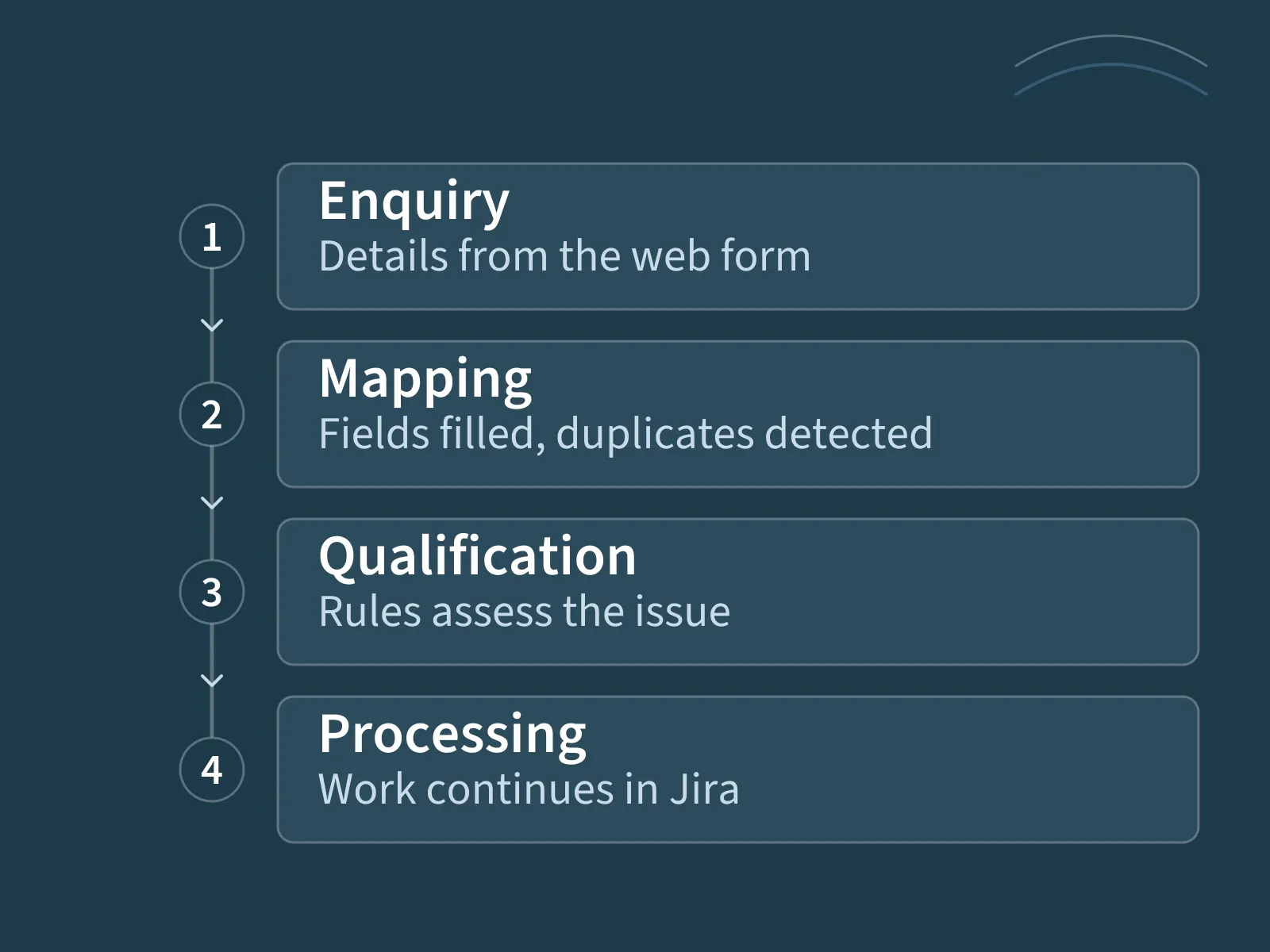
The path from an enquiry to a processed issue shows how several rules interlock: the enquiry becomes an issue, receives an assignee and a due date, and the assignee is mentioned. If the issue is left untouched, the deadline rule steps in. Once it is qualified, the follow-on issues are created.
This workflow is a configuration, not a fixed component. An investment oversight function that only monitors deadlines uses the same engine with different rules — and without a single line from the sales workflow.
Recurring transfers, reminders and assignments happen by themselves. Where a human decision is needed, we build that step into the workflow explicitly rather than leaving it to the automation.
Every rule is written down and readable: selection, condition, action. That makes it traceable why something happened — and a change to the workflow is a change to the rule, not a project.
Several areas or companies run with separate configuration and separate connections; a fault in one area does not hold up the others. The engine appears under your name, not ours.
The engine is maintained and developed as a product, not as a one-off adaptation.
We do not name our clients unless we have their permission to do so. We handle every client that way — including you. We are happy to walk you through the workflow in a conversation.
These technical measures form part of the implementation; your operational requirements are assessed for the specific use case.
The engine works with Jira Cloud; it is not designed for Jira Data Center.
Out of selection, condition and action we assemble a new workflow without any change to a program: select different issues, measure deadlines differently, populate other fields, compose text from details on the issue, mirror further relationships between projects.
A new capability, by contrast, is developed and added as a building block — a condition that does not yet exist, a connection to a further system, a document type of its own. That is the intended route and the normal case: conversion, enrichment, free-text extraction, form capture and documentation all came about that way, and each of those building blocks has been available ever since.
The difference is something you can plan around — for a rule the effort lies in agreeing it, for a building block in implementing it. We say in advance which of the two your requirement calls for.
We start by reviewing your Jira environment, Confluence where relevant, the data sources involved and the intended workflow. This establishes the required connections, field mappings and rules.
The use of AI is also defined explicitly: which information may be processed, which outputs require professional review and which services may be involved?
Setup, adaptations and ongoing services are identified in the proposal. The scope depends on your workflow and the agreed operating model.
When company records first need to be researched and reviewed, Arkcanis Prospect Scout can support this preceding stage.
Scout helps teams discover companies and work through their records. Qualified prospects are then passed into the sales workflow supported by the Automation Engine.
A rule is only as good as the workflow it reflects. Where responsibilities, fields and stages are not yet decided, the work starts in Atlassian consulting — the process is modelled there before it is automated.
Tell us briefly what it is about – we will get back to you.